For this guide you will need the following items:
- Eclipse IDE for Java Developers - http://www.eclipse.org/downloads/moreinfo/java.php
- BurpSuite Free - http://portswigger.net/burp/download.html
- Burp Extender classes - http://portswigger.net/burp/extender/
- http://portswigger.net/burp/extender/IBurpExtender.java
- http://portswigger.net/burp/extender/IBurpExtenderCallbacks.java
- http://portswigger.net/burp/extender/IHttpRequestResponse.java
- http://portswigger.net/burp/extender/IScanIssue.java
- http://portswigger.net/burp/extender/IScanQueueItem.java
- http://portswigger.net/burp/extender/IMenuItemHandler.java
After downloading and opening up Eclipse you will need to create a new java project. This can be done by clicking "File->New Java Project". Fill in a project name and click finish.

Once the project has been created you will need to create a new package called "burp". This can be done by right clicking the "src" folder under your new project and selecting "New->Package". When the dialog comes up set the "Name" as "burp":

You should now have a package named "burp" under the source folder in the right pane. Now you will need to import the Burp extender classes into your project. Download all of the extender classes to a local folder, once this is done right click on the "burp" package in your project and select "Import". On the dialog window that comes up select "General->File System" and hit "next":

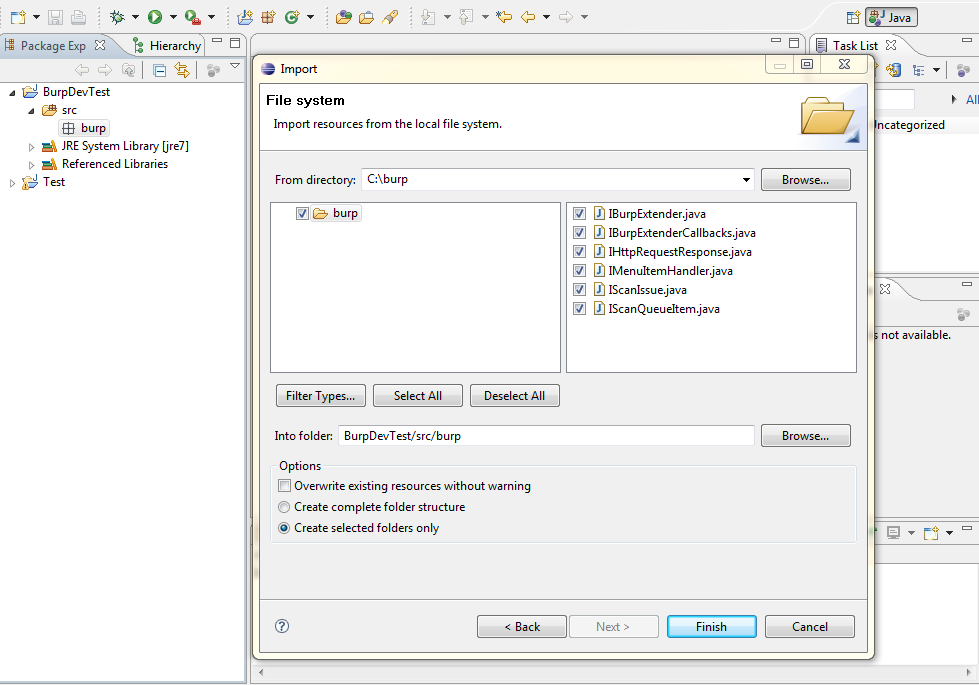
On the next dialog you will need to navigate to where you downloaded the Burp extender classes to. Once you have done this you should see the classes, click on the folder to select all items and click "Finish":
Next we can add the Burp application into the project. To do this click on "Project->Properties" on the top toolbar. When the dialog opens select "Java Build Path" and then the "Libraries" tab. On this dialog click "Add External JARs..."


In the "BurpExtender" class you can enter the following:
package burp;
public class BurpExtender
{
public void registerExtenderCallbacks(IBurpExtenderCallbacks callbacks)
{
callbacks.registerMenuItem("Hello World.", new CustomMenuItem());
}
}
class CustomMenuItem implements IMenuItemHandler
{
public void menuItemClicked(String menuItemCaption, IHttpRequestResponse[] messageInfo)
{
try
{
System.out.println("Hello From Burp!");
System.out.println("Request Item Details");
System.out.println("Host: " + messageInfo[0].getHost());
System.out.println("URL: " + messageInfo[0].getUrl());
}
catch (Exception e)
{
e.printStackTrace();
}
}
}
After adding the content to your "BurpExtender" class you are ready to run the project for the first time. Click on "Run->Run" from the menu. You should see the following dialog asking how it should run your project:


When you click the "Hello World." menu button you should see some information about the request in your eclipse console window:

That's it, you now have setup your working development environment for building your own Burp extensions. The javadocs for the Burp Extender interfaces are available on the Extender web page:
- http://portswigger.net/burp/extender/burp/IBurpExtender.html
- http://portswigger.net/burp/extender/burp/IBurpExtenderCallbacks.html
- http://portswigger.net/burp/extender/burp/IHttpRequestResponse.html
- http://portswigger.net/burp/extender/burp/IScanIssue.html
- http://portswigger.net/burp/extender/burp/IScanQueueItem.html
- http://portswigger.net/burp/extender/burp/IMenuItemHandler.html
Related word
- Termux Hacking Tools 2019
- Pentest Tools For Android
- Pentest Tools Github
- Free Pentest Tools For Windows
- Hacking Tools For Kali Linux
- Hacker Tools 2020
- Hackers Toolbox
- Best Hacking Tools 2019
- Hacking Tools For Games
- Hacking Tools Hardware
- Beginner Hacker Tools
- Tools For Hacker
- Pentest Tools Url Fuzzer
- Hack Rom Tools
- Hacking Tools For Mac
- Hacking App
- Pentest Tools Linux
- What Is Hacking Tools
- Hacker
- Hack Tools Download
- Pentest Tools Tcp Port Scanner
- Growth Hacker Tools
- Hacking App
- Pentest Tools Android
- What Are Hacking Tools
- Pentest Box Tools Download
- Pentest Tools Tcp Port Scanner
- Hack Tools Online
- Pentest Tools Open Source
- Hacking Tools Usb
- Ethical Hacker Tools
- Physical Pentest Tools
- Pentest Tools List
- Hack Tools 2019
- Hacking Tools 2019
- Hacking Tools 2019
- Best Hacking Tools 2020
- Hacking Tools And Software
- Hacking Tools Usb
- Nsa Hack Tools Download
- Hacking Tools Github
- New Hacker Tools
- Hack And Tools
- Hack Tools
- Hacker Tools For Mac
- Hacking Tools For Beginners
- Hacking Tools Download
- Pentest Tools Find Subdomains
- Pentest Tools List
- Pentest Tools Alternative
- Pentest Tools Github
- Hacker Tools Hardware
- Best Hacking Tools 2019
- Pentest Tools Url Fuzzer
- Pentest Tools Url Fuzzer
- Hack Tools 2019
- New Hack Tools
- Hacking Tools Github
- Pentest Tools Open Source
- Hacker Tools Hardware
- Pentest Tools For Android
- Hacking Tools Hardware
- Nsa Hack Tools
- Best Hacking Tools 2019
- Computer Hacker
- Android Hack Tools Github
- Hack Apps
- Hacker Tools Hardware
- Pentest Automation Tools
- Hacking Tools Mac
- Free Pentest Tools For Windows
- Hack Tools Mac
- Tools Used For Hacking
- Black Hat Hacker Tools
- Hacking Tools Windows
- Hacking Tools Mac
- Pentest Box Tools Download
- Pentest Reporting Tools
- Hak5 Tools
- Pentest Tools Review
- Hacks And Tools
- Hacking Tools Windows
- Pentest Tools Tcp Port Scanner
- Pentest Tools For Android
- Hacking Tools
- Tools 4 Hack
- Hacking Tools For Kali Linux
- Github Hacking Tools
- Pentest Tools Nmap
- What Are Hacking Tools
- Hack Tools For Ubuntu
- Pentest Tools For Windows
- Hack Tools For Windows
- Hacker Tool Kit
- Github Hacking Tools
- Easy Hack Tools
- Hackrf Tools
- Hacking Tools For Mac
- Wifi Hacker Tools For Windows
- Hacks And Tools
- Pentest Tools Url Fuzzer
- Hacking Tools Windows
- Hacking Tools For Mac
- Hacker Tools Mac
- Hack Tools For Ubuntu
- Hacker Search Tools
- Tools 4 Hack
- Easy Hack Tools
- Pentest Tools Url Fuzzer
- Kik Hack Tools
- How To Make Hacking Tools
- Underground Hacker Sites
- Hack Tool Apk No Root
- Pentest Tools Apk
- Pentest Tools Open Source
- Pentest Reporting Tools
- Hacking Tools Online
- Pentest Recon Tools
- Pentest Tools Review
- Easy Hack Tools
- Hacking Tools For Beginners
- Hacking Tools Free Download
- Hacking Tools Download
- Hacking Tools For Windows
- Hacking Tools For Mac
- Pentest Recon Tools

Nincsenek megjegyzések:
Megjegyzés küldése